CATEGORY

see also

Infolinks In Text Ads

Search This Blog

Download Adobe Photoshop CS6 cracked

1. Install Photoshop CS6 as a trial version, you can download trial from official website.
2. After you have installed it as a trial you do not need to run it, just go to start and search Notepad and open it as an administrator.
3. Now browse Computer > Local Disk (C:) > Windows > System32 > Drivers > Etc. > Hostsnow maybe you will not be able to see the HOSTS file in etc. folder, just choose show all files and it will be visible.
4. Now copy text from this file and paste in the bottom of the HOSTS file like in the image below and than save that file.
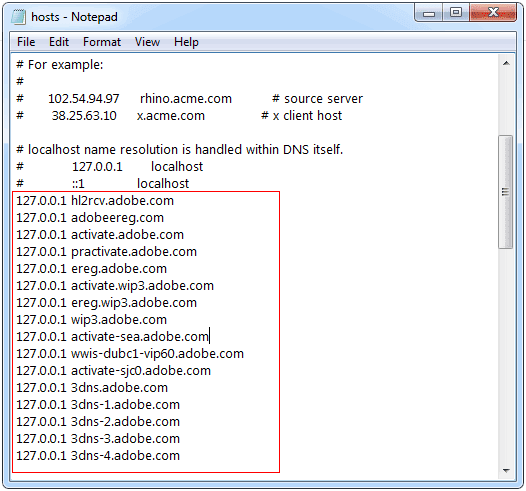
HOSTS File
5. Now your main step is completed and now you can fire up your Photoshop CS6 and pump up any serial key from below and choose OK.
1330-1156-0980-8094-0093-3404
1330-1416-8167-3432-7342-5065
1330-1516-6501-3782-3926-4993
1330-1812-7531-2275-1508-2831
1330-1920-6741-8538-0788-4749
1330-1434-7193-4776-5834-3132
1330-1129-4054-4300-1974-8912
1330-1498-7328-5130-3384-9032
1330-1655-3029-6637-2795-4117
1330-1691-2320-1630-3127-2515
That’s it now your Photoshop will accept that serial by showing you a green arrow mark, if it asks you to register your product, well I will recommend you too ignore that step and continue exploring your creativity.us

HOW TO USE TRIAL SOFTWARES FOREVER


Time Stopper is the software which can stop the time for try out version software. When you stop the time you can use your try-out software forever. When you stop the time of a try-out version using this Time Stopper it works via this Time Stopper. Real time and date run normally on your system. You can use any number of try-out version software with this software.

How Time Stopper Works

  • Open Time Stopper
  • Browse and select .exe of required trial software
  • Choose the new date (Any date which occurs in between your trial software time period before expiration, suggestion: set it to two days before trial software expiration date.)
  • Choose any time
  • Click open software on your selected date
If you wish to create an icon for your modified trial software and do not want to open Time stopper every time then use last button in software to create new icon. open that trial software after that from that newly created icon always otherwise it can expire.

DOWNLOAD- TIME STOPPER 4
http://www.brothersoft.com/time-stopper-download-135749-s1.html

Transform Blogger Links into Multicolored Rainbow Links


1. Go to Blogger.com and Sign In to your account.
2. Now choose your Blog and Navigate to Template > Edit HTML.
3. Now search for </head> tag and paste the below script right above it.
<script type='text/javascript'>
//<![CDATA[
function makeColor(){if(elmS==0){elmR=elmV;elmG=elmV;elmB=elmV}else{t1=elmV;t2=(255-elmS)*elmV/255;t3=elmH%60;t3=(t1-t2)*t3/60;if(elmH<60){elmR=t1;elmB=t2;elmG=t2+t3}else if(elmH<120){elmG=t1;elmB=t2;elmR=t1-t3}else if(elmH<180){elmG=t1;elmR=t2;elmB=t2+t3}else if(elmH<240){elmB=t1;elmR=t2;elmG=t1-t3}else if(elmH<300){elmB=t1;elmG=t2;elmR=t2+t3}else if(elmH<360){elmR=t1;elmG=t2;elmB=t1-t3}else{elmR=0;elmG=0;elmB=0}}elmR=Math.floor(elmR).toString(16);elmG=Math.floor(elmG).toString(16);elmB=Math.floor(elmB).toString(16);if(elmR.length==1)elmR="0"+elmR;if(elmG.length==1)elmG="0"+elmG;if(elmB.length==1)elmB="0"+elmB;elmH=elmH+rate;if(elmH>=360)elmH=0;return"#"+elmR+elmG+elmB}function ChangeColor(){objActive.style.color=makeColor()}function Mozilla_stopRainbowAnchor(a){if(act){if(objActive.nodeName=="A"){objActive.style.color=clrOrg;clearInterval(TimerID);act=0}}}function Mozilla_doRainbowAnchor(a){if(act==0){obj=a.target;while(obj.nodeName!="A"&&obj.nodeName!="BODY"){obj=obj.parentNode;if(obj.nodeName=="A"||obj.nodeName=="BODY")break}if(obj.nodeName=="A"&&obj.href!=""){objActive=obj;act=1;clrOrg=obj.style.color;TimerID=setInterval("ChangeColor()",100)}}}function stopRainbowAnchor(){if(act){if(objActive.tagName=="A"){objActive.style.color=clrOrg;clearInterval(TimerID);act=0}}}function doRainbowAnchor(){if(act==0){var a=event.srcElement;while(a.tagName!="A"&&a.tagName!="BODY"){a=a.parentElement;if(a.tagName=="A"||a.tagName=="BODY")break}if(a.tagName=="A"&&a.href!=""){objActive=a;act=1;clrOrg=objActive.style.color;TimerID=setInterval("ChangeColor()",100)}}}function stopRainbow(){if(act){objActive.style.color=clrOrg;clearInterval(TimerID);act=0}}function doRainbow(a){if(act==0){act=1;if(a)objActive=a;else objActive=event.srcElement;clrOrg=objActive.style.color;TimerID=setInterval("ChangeColor()",100)}}var rate=20;if(document.getElementById)window.onerror=new Function("return true");var objActive;var act=0;var elmH=0;var elmS=128;var elmV=255;var clrOrg;var TimerID;if(document.all){document.onmouseover=doRainbowAnchor;document.onmouseout=stopRainbowAnchor}else if(document.getElementById){document.captureEvents(Event.MOUSEOVER|Event.MOUSEOUT);document.onmouseover=Mozilla_doRainbowAnchor;document.onmouseout=Mozilla_stopRainbowAnchor}
//]]>
</script>

4. That’s it now just Save your Template and refresh your blog to see the effect.
Hope you liked this small tutorial,


How to Create Easy Alert Pop-Up Box in Blogger


1. Go to Blogger.come and Sign In to your Account.
2. Now choose your blog and Navigate to Template > Edit HTML.
3. Now you can place the below code anywhere but if you wanna render this alert box faster than paste it right above the </head> tag or if you want it to load after the blog has been loaded than you can place the below code after the </body> tag.
<script type='text/javascript'>
alert(&quot;Wats Up Guys ! Welcome to best of hacks&quot;);
</script>
4. Now just change the red line with your line and your pop-up box is ready to be popped-up.

How to Show this Pop-Up Box only on the Homepage :

If you just want to render this alert box on the Homepage of your Blog you can use the below code follow the same procedure above.
<b:if cond='data:blog.url == data:blog.homepageUrl'>
<script type='text/javascript'>
alert(&quot;Wats Up Guys ! Welcome to best of hacks&quot;);
</script>
</b:if>
So now just refresh your blog and enjoy this new popup box, share news, important information or a hearty greeting. Do share this post with all your friends if you liked 

like us on fb